TechnicalBuild an agent

Build an agentLesson 10 of 10

Agent memory

Let the agent remember lasting facts about you between sessions with a “remember” tool.

3 min readLesson

Build an agent10

Before you start Finish Lesson 9. This lesson changes files from it.

You'll learn

  • Build a tool that calls the AI itself
  • Store memories in a file behind a small Store class
  • Load memories into the instructions in the next session

How it works

Memory is just another tool. Its description tells the AI to save only lasting facts (your name, preferences, how your project is set up), not small talk.

When called, the tool reads the memory file, asks the AI to merge in the new fact (no duplicates, replace anything outdated), and saves the result to storage/LEO_MEMORY.md.

The base Agent then adds that file to its instructions, so a brand-new session already knows what you told it last time.

  • Memory: Long-term facts saved to a file and loaded into every new session.
  • LOCK_EX: Stops two writes to the same file clashing.

Step by step

1Create the memory store

A small class that hides where memory lives, so you could move it to a database later.

New file · app/Ai/Memory/Store.php

<?php

namespace App\Ai\Memory;

class Store
{
    public function path(): string
    {
        return storage_path('LEO_MEMORY.md');
    }

    public function fetch(): string
    {
        return @file_get_contents($this->path()) ?: '';
    }

    public function update(string $memory): void
    {
        // LOCK_EX stops two writes from clashing.
        file_put_contents($this->path(), $memory, LOCK_EX);
    }
}

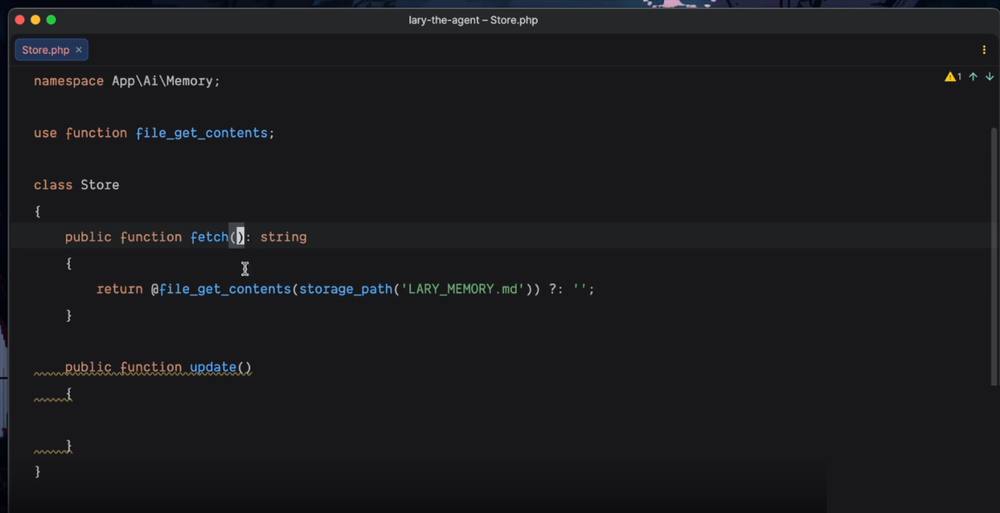
The Store class: fetch() and update().

The Store class: fetch() and update().

2Create the remember tool

Read the long description: it is how the AI decides what is worth remembering.

New file · app/Ai/Tools/Memory.php

<?php

namespace App\Ai\Tools;

use App\Ai\Agents\Agent;
use App\Ai\Memory\Store;
use Illuminate\Support\Facades\Http;

class Memory implements Tool
{
    public function __construct(protected Store $store = new Store) {}

    public function definition(): array
    {
        return [
            'type' => 'function',
            'name' => 'remember',
            'description' => <<<'DESC'
                Save a stable, long-term fact about the user or their project.

                Only use this for things that will still be useful in future sessions, such as:
                - preferences ("prefers Pest over PHPUnit")
                - project context ("works on a Laravel + Inertia app")
                - identity ("goes by Jeffrey")

                Do NOT use it for small talk, temporary state, secrets or API keys,
                or anything already in the project guidelines or existing memories.

                Write the fact as a short third-person sentence that makes sense on its own.
                DESC,
            'parameters' => [
                'type' => 'object',
                'properties' => [
                    'fact' => ['type' => 'string', 'description' => 'The fact to remember.'],
                ],
                'required' => ['fact'],
                'additionalProperties' => false,
            ],
            'strict' => true,
        ];
    }

    public function use(array $arguments = []): string
    {
        $fact = $arguments['fact'];
        $memory = $this->store->fetch();

        $refreshed = $this->refresh($memory, $fact);

        if (trim($refreshed) === trim($memory)) {
            return "Fact already known: {$fact}";
        }

        $this->store->update($refreshed);

        return "Fact remembered: {$fact}";
    }

    /**
     * Ask the AI to merge the new fact into the existing memory file.
     */
    protected function refresh(string $memory, string $fact): string
    {
        $response = Http::withToken(config('services.openai.key'))
            ->post('https://api.openai.com/v1/responses', [
                'model' => config('services.openai.model'),
                'instructions' => <<<'INSTR'
                    You maintain a short markdown list of long-term facts about a user.
                    You get the existing markdown and one new candidate fact. Return the full, updated markdown.
                    - If the fact is new, add it as a bullet point.
                    - If it is already covered, return the existing markdown unchanged.
                    - If it updates or contradicts an existing fact, replace the old fact.
                    - Do not add or remove anything else. Return only markdown, no code fences.
                    INSTR,
                'input' => [
                    ['role' => 'user', 'content' => "Existing memory:\n\n{$memory}\n\nNew fact:\n\n{$fact}"],
                ],
            ])
            ->throw()
            ->json();

        // If something odd comes back, keep what we had.
        return Agent::text($response) ?: $memory;
    }
}
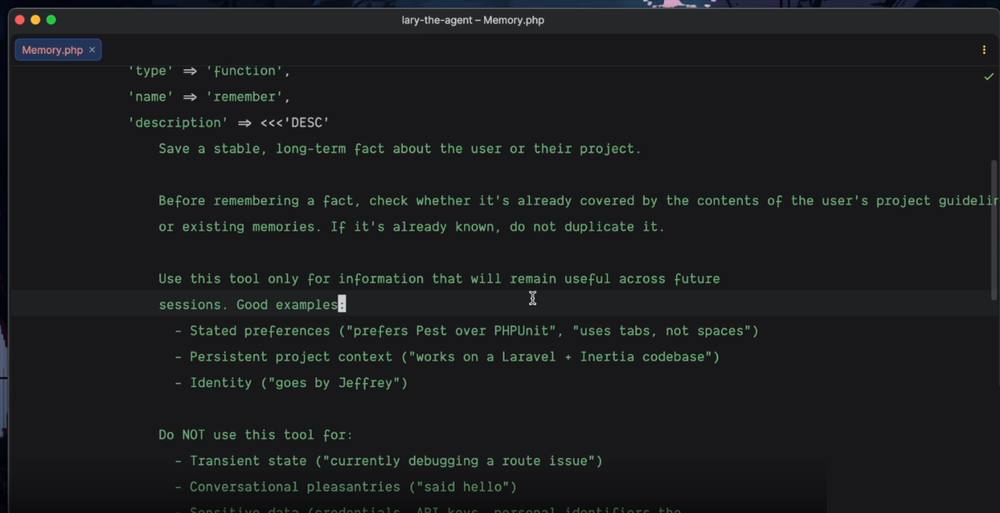
The remember tool’s description: what is worth remembering.
The remember tool’s description: what is worth remembering.

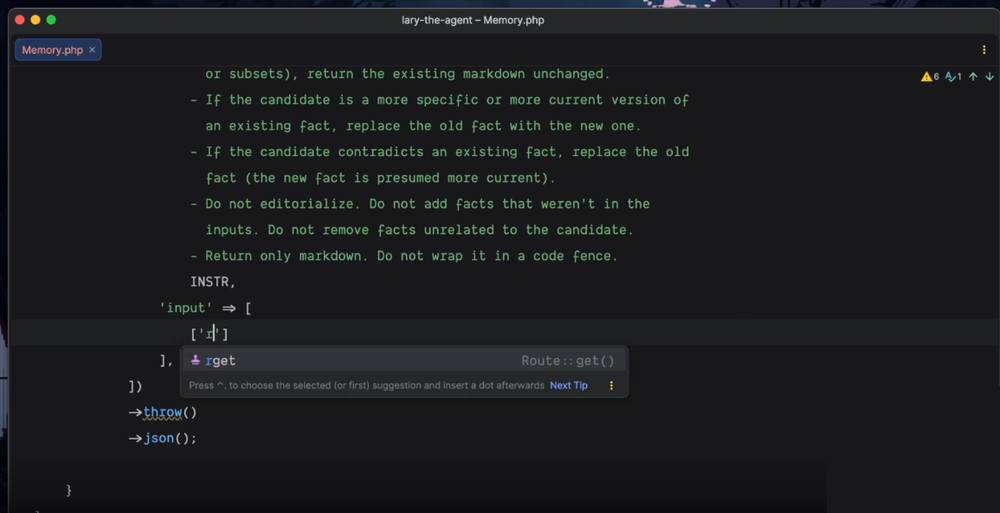
Instructions for merging a new fact into the memory file.

Instructions for merging a new fact into the memory file.

3Give the chatbot the tool

Replace ChatbotAgent.php. It adds new Memory to the tools.

Replace file · app/Ai/Agents/ChatbotAgent.php

<?php

namespace App\Ai\Agents;

use App\Ai\Attributes\CompactsAfter;
use App\Ai\Tools\CurrentTime;
use App\Ai\Tools\EditFile;
use App\Ai\Tools\Glob;
use App\Ai\Tools\Memory;
use App\Ai\Tools\ReadFile;
use App\Ai\Tools\Revenue;
use App\Ai\Tools\RunBash;
use App\Ai\Tools\SearchFiles;
use App\Ai\Tools\WriteFile;

#[CompactsAfter(30)]
class ChatbotAgent extends Agent
{
    public function persona(): string
    {
        return 'You are a bit of a jerk and are sarcastic with every reply, but you help out with programming tasks.';
    }

    public function tools(): array
    {
        return [
            new ReadFile,
            new WriteFile,
            new EditFile,
            new Glob,
            new SearchFiles,
            new RunBash,
            new CurrentTime,
            new Revenue,
            new Memory,
        ];
    }
}

4Load memory into the instructions

In Agent.php, add use App\Ai\Memory\Store; to the imports, and add this block inside instructions(), just above return $instructions;:

Edit · app/Ai/Agents/Agent.php → instructions()

if ($memory = (new Store)->fetch()) {
    $instructions .= "\n\n## What You Remember About The User\n\n".$memory;
}

This is the finished Agent.php. The complete file is in the Final code section.

Check your work

Run php artisan agent and type:

I have changed my name to Joe. Then type exit, start php artisan agent again, and ask: What is my name?

You should see

Running tool: remember after the first message, a new file at storage/LEO_MEMORY.md, and Joe in the new session.

If it doesn’t work

  • It never calls remember: Say something clearly lasting, e.g. “Remember that I prefer tabs.”
  • Make it forget everything: Delete storage/LEO_MEMORY.md.

Check yourself

1“Remember that Mikey likes extra cheese.” Why does the remember tool call the AI instead of just appending a line?

Reveal answer

✓ Answer

Merging is fuzzy work: spotting duplicates and replacing outdated facts. The AI handles that well.

2A new session starts in the lair. Where does the agent read its memories from?

Reveal answer

✓ Answer

From instructions(), which appends the contents of the memory file.