
TechnicalEloquent performance

Eloquent performanceLesson 23 of 28

Ordering Data For Humans Using Natural Sort

Human-friendly order: a database function, not a PHP sort.

1 min readIntermediateLesson

Eloquent performance23

The problem

Alphabetical sorting puts "iPhone 11" before "iPhone 3". Sorting in PHP means loading every row, which breaks pagination.
The fix

Add a natural-sort function to the database (in a migration) and order by it.

✕ Instead of this

Device::all()
    ->sortBy('name', SORT_NATURAL)
    ->forPage($page, 15);
// loads every device to show 15

✓ Do this

DB::unprepared('CREATE FUNCTION naturalsort ...');   // up
DB::unprepared('DROP FUNCTION IF EXISTS naturalsort'); // down
Device::orderByRaw('naturalsort(name)')->paginate();

The benefit

Human-friendly order (iPhone 3 before iPhone 11) with normal pagination.

Why it works

Natural sort reads numbers as whole numbers, so 3 comes before 11. The function (based on Drupal's) lives in the database, so sorting still happens there.

Watch out

  • DB::unprepared() runs raw SQL as-is.
  • Postgres can index naturalsort(name). MySQL can't index user-defined functions.

Frame from lesson 23

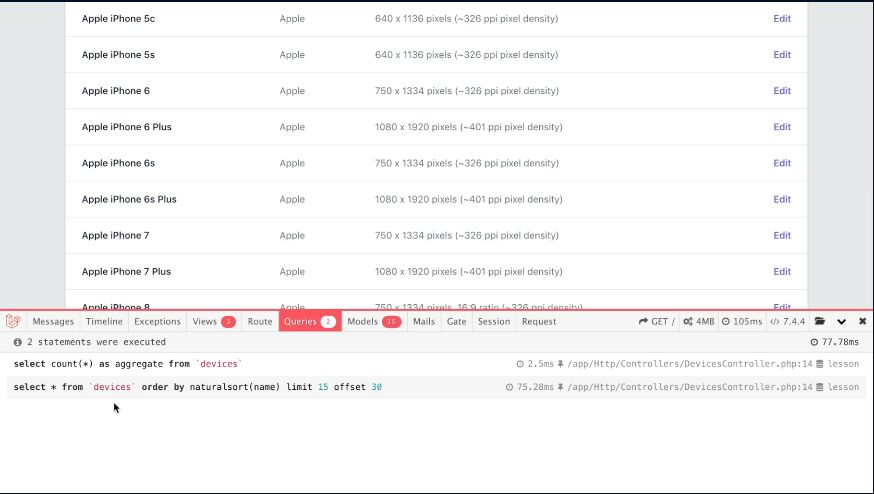
Devices in natural order (iPhone 5c, 5s, 6, 6 Plus … 8) via order by naturalsort(name), a user-defined MySQL function.

Key takeaway

Human-friendly order: a database function, not a PHP sort.

Check yourself

Why not just use sort($array, SORT_NATURAL)?

Reveal answer

✓ Answer

You'd have to load every row to sort them, even to show 15.