A blog archive used about 20 MB of memory. select * was loading every column, including the large post body the page never shows.
Memory
19.8 MB4.35 MB
78% lower
A bare Laravel page uses ~4 MB

Eloquent performanceLesson 2 of 28
Fetch only what you show. It matters most on lists, exports and anything touching many rows.
1 min readIntermediateLesson
A blog archive used about 20 MB of memory. select * was loading every column, including the large post body the page never shows.
Only select the columns the page actually uses, on the main query and on eager loads.
Post::with('author')
    ->latest('published_at')
    ->get();
// select * : every column, including the large body
Post::select('id', 'title', 'slug', 'published_at', 'author_id')
    ->with('author:id,name')
    ->latest('published_at')
    ->get();
Memory drops to roughly what an empty Laravel page uses, because the big body column never leaves the database.
Memory
19.8 MB4.35 MB
78% lower
A bare Laravel page uses ~4 MB
id. Eloquent relies on the primary key.author_id), or the relation comes back empty.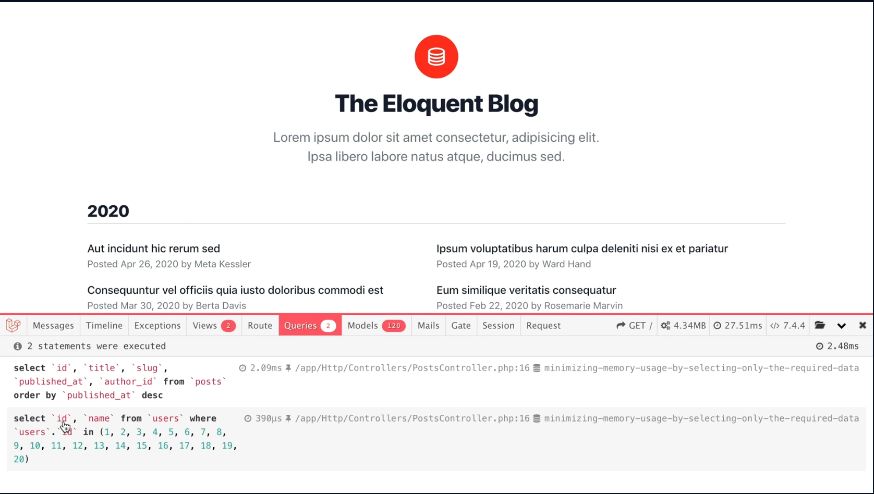
After trimming columns: the posts query selects only id, title, slug, published_at and author_id, and the author eager load selects only id and name. Memory is down to 4.34 MB.
Fetch only what you show. It matters most on lists, exports and anything touching many rows.
You select only id and title, then eager load author. Every author is null. Why?
✓ Answer
author_id wasn't selected, so Eloquent has nothing to match posts to authors with.