
TechnicalEloquent performance

Eloquent performanceLesson 13 of 28

Run Authorization Policies in the Database

Filtering a list by permission? Do it in SQL with a scope.

1 min readIntermediateLesson

Eloquent performance13

The problem

Sales reps may only see their own customers. Checking a policy per row in Blade breaks pagination ("1-15" but 4 rows visible). Filtering in PHP loads every customer.
The fix

Write the rule as a query scope, so the database only returns customers the user is allowed to see.

✕ Instead of this

$customers = Customer::orderBy('name')->get()
    ->filter(fn ($c) => auth()->user()->can('view', $c));
// loads every customer, then throws most away

{{-- or in Blade: breaks pagination --}}
@can('view', $customer) ... @endcan

✓ Do this

public function scopeVisibleTo($query, User $user)
{
    if ($user->is_owner) {
        return;
    }

    $query->where('sales_rep_id', $user->id);
}
// Customer::visibleTo(auth()->user())->paginate();

The benefit

Pagination counts the right rows, and only the customers you may see ever leave the database.

Why it works

The permission becomes a WHERE clause, so pagination counts the right rows and nothing extra leaves the database. Owners skip the filter entirely.

Watch out

  • Keep the regular policy for single records. The scope is for lists.

Frame from lesson 13

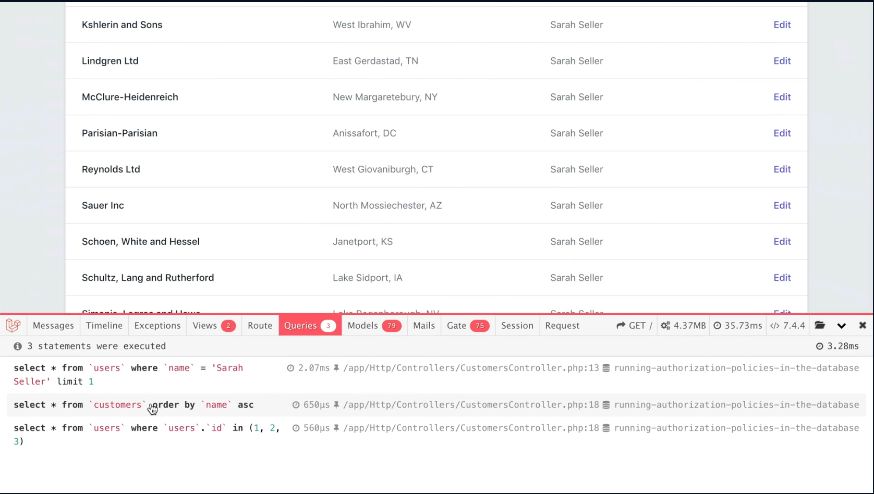
The anti-pattern this lesson fixes: authorising in PHP means the query is select * from customers order by name with no WHERE, so every customer is loaded and filtered afterwards. The visibleTo scope adds where sales_rep_id = ? instead.

Key takeaway

Filtering a list by permission? Do it in SQL with a scope.

Check yourself

Why does @can inside the loop break pagination?

Reveal answer

✓ Answer

The database already returned 15 rows. Hiding some in the view leaves gaps, and the page totals are wrong.