What’s M-V-C?
Frameworks like Laravel, Rails, Spring, and even frontend frameworks lean on MVC or its principles. Why? Because it enforces a structure.
It’s been around so long, it’s basically software development’s comfort food.
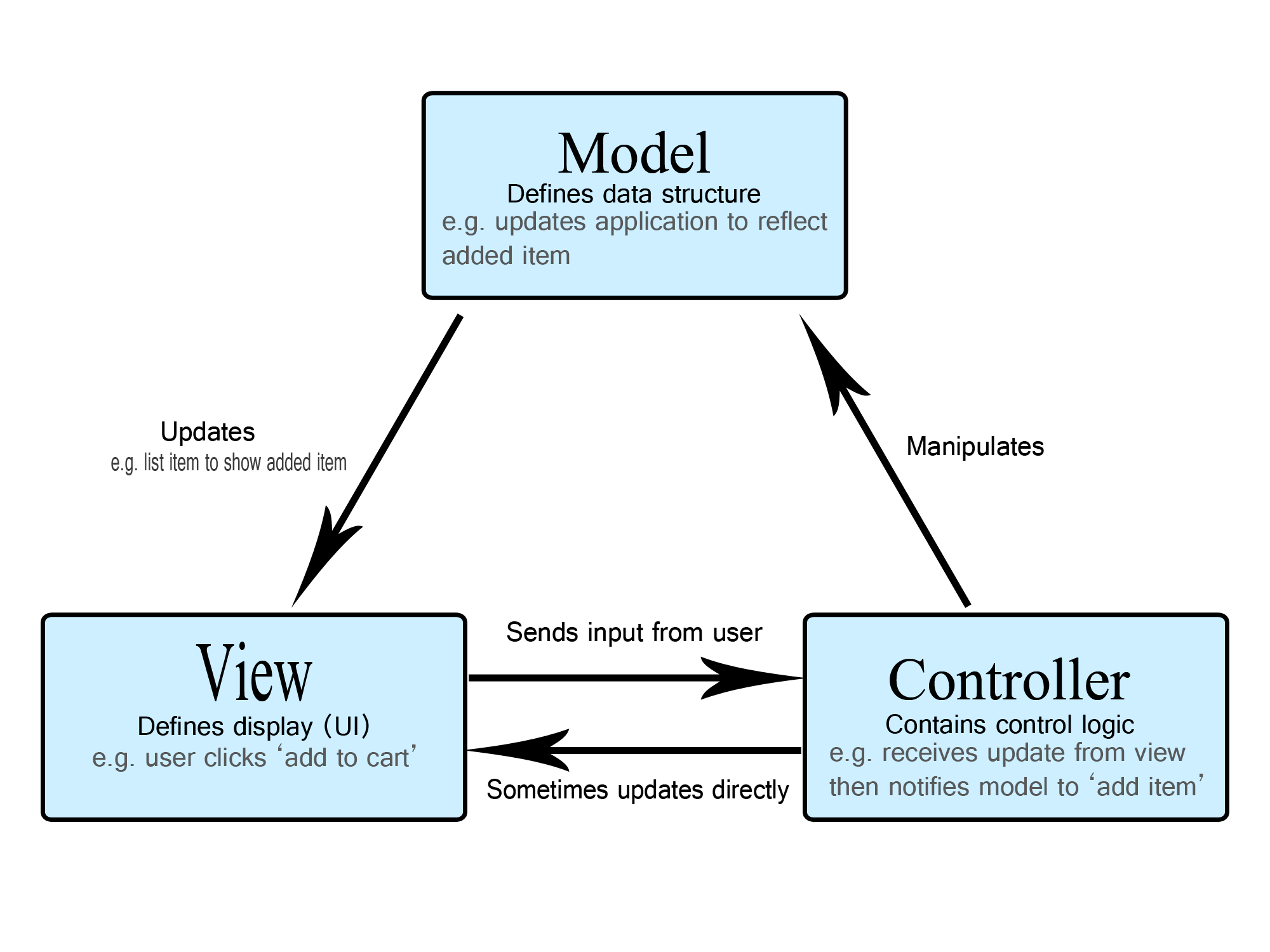
Model: This is where all the logic lives—the brain of the operation. It handles the data, talks to the database, and ensures everything is up-to-date. It’s the one quietly doing all the heavy lifting, but never gets the spotlight.
View: This handles the user interface, the bit that actually gets to show off. It takes the Model’s data and presents it all pretty, but it doesn’t care how the data got there. It’s like the front person of a band—just here to look good.
Controller: The middle manager. It takes user input, tells the Model what to do, and decides which View to display. It’s the mediator, keeping everything flowing smoothly between the brains (Model) and the beauty (View). Without it, chaos reigns.
A Quick Example
Let’s say you’re building a simple contact form for a website. The requirements are minimal:
Display a form to the user.
Validate the input (e.g., ensure the email address is valid).
Send the data to an email address or save it to a database.
Show a "Thank You" message after submission.
Using an MVC framework for this simple app might look like this:
Create a ContactForm model to handle the data. Even though it’s just a few fields (name, email, message), you’ll need to define a model file and, depending on the framework, possibly validation rules.
class ContactForm
{
    public string $name;
    public string $email;
    public string $message;

    public function validate(): bool
    {
        return filter_var($this->email, FILTER_VALIDATE_EMAIL) !== false;
    }
}
You create a separate view file (or files) for rendering the form and the "Thank You" message. That’s two files for some basic HTML. The form itself:
<!-- contact_form.blade.php -->
<form method="POST" action="/contact">
    <input type="text" name="name" placeholder="Your Name">
    <input type="email" name="email" placeholder="Your Email">
    <textarea name="message" placeholder="Your Message"></textarea>
    <button type="submit">Send</button>
</form>
And the thank you page.
<!-- thank_you.blade.php -->
<h1>Thank you for contacting us!</h1>
You create a ContactController to handle the form submission. It validates the input, processes the data, and decides which view to display.
class ContactController
{
    public function showForm()
    {
        return view('contact_form');
    }

    public function submitForm(Request $request)
    {
        $contactForm = new ContactForm();
        $contactForm->name = $request->input('name');
        $contactForm->email = $request->input('email');
        $contactForm->message = $request->input('message');

        if (!$contactForm->validate()) {
            return back()->withErrors(['email' => 'Invalid email address']);
        }

        // Send email or save to the database here
        return view('thank_you');
    }
}
And finally, you need to define routes to handle the form display and submission.
Route::get('/contact', [ContactController::class, 'showForm']);
Route::post('/contact', [ContactController::class, 'submitForm']);
So What’s The Problem?
It’s not all biscuits and gravy (or tea and scones). While MVC is beloved by frameworks, it does come with its share of quirks and challenges.
I’ve seen firsthand how easily an MVC framework can spiral out of control—imagine 5,000 line controller methods stuffed with hundreds of if statements, views bloated with logic, and models doing far more than their fair share of the work.
Controllers Become a Dumping Ground
The Controller, meant to be a light mediator, can easily turn into a bloated mess if you're not careful. Developers often cram business logic, routing, validation, and even rendering responsibilities into controllers.
class OrderController
{
    public function processOrder(Request $request)
    {
        // Validation (should be handled elsewhere)
        if (!$request->has(['product_id', 'quantity', 'user_id'])) {
            return response()->json(['error' => 'Missing required fields'], 400);
        }

        if ($request->input('quantity') <= 0) {
            return response()->json(['error' => 'Quantity must be greater than zero'], 400);
        }

        // Business logic (should be in a service or action class)
        $product = Product::find($request->input('product_id'));
        if (!$product || $product->stock < $request->input('quantity')) {
            return response()->json(['error' => 'Product unavailable'], 400);
        }

        $user = User::find($request->input('user_id'));
        if (!$user) {
            return response()->json(['error' => 'User not found'], 404);
        }

        // Order update (should be in the model or service layer)
        $totalPrice = $product->price * $request->input('quantity');
        $order = new Order();
        $order->user_id = $user->id;
        $order->product_id = $product->id;
        $order->quantity = $request->input('quantity');
        $order->total_price = $totalPrice;
        $order->status = 'pending';
        $order->save();

        $product->stock -= $request->input('quantity');
        $product->save();

        // Returning a response (should be in a view or API resource class)
        return response()->json([
            'message' => 'Order processed successfully',
            'order_id' => $order->id,
            'total_price' => $totalPrice,
        ], 201);
    }
}
Tightly Coupled Views and Controllers
While MVC preaches separation of concerns, real-world implementations often blur the lines. Views might get too smart (with conditional logic creeping in), or controllers start manipulating how data is presented, creating a dependency web that’s anything but clean.
class ProductController
{
    public function showProducts()
    {
        // Fetch data and manipulate it directly for the view
        $products = Product::all()->map(function ($product) {
            return [
                'name' => $product->name,
                'price' => $product->price,
                'discounted_price' => $product->price * 0.9, // Calculating discount here
                'is_in_stock' => $product->stock > 0, // Adding custom field
            ];
        });

        // Directly passing manipulated data to the view
        return view('products.index', ['products' => $products]);
    }
}
Duplicated Business Logic
Every copy creates another point of failure, making changes harder to track and inconsistencies almost inevitable. It’s the classic "fix one bug, introduce three more" scenario because you’ve got the same logic scattered across multiple places.
Imagine you have a rule for calculating discounts, but instead of centralising it, the logic is duplicated across the codebase.
class ProductController
{
    public function applyDiscount($productId)
    {
        $product = Product::find($productId);

        // Discount logic directly in the controller
        $discountedPrice = $product->price * 0.9;

        return response()->json(['discounted_price' => $discountedPrice]);
    }
}
And another controller:
class CheckoutController
{
    public function calculateTotal(array $cartItems)
    {
        $total = 0;

        foreach ($cartItems as $item) {
            $product = Product::find($item['product_id']);

            // Same discount logic repeated here
            $total += ($product->price * 0.9) * $item['quantity'];
        }

        return $total;
    }
}
Scaling Can Get Messy
As the application grows, managing all those models, views, and controllers can turn into a logistical nightmare. You might end up with hundreds of files, and finding the right place to make changes can feel like navigating a maze.
Early Stage:
Imagine an e-commerce application that starts small but grows significantly over time. The application begins with a simple structure:
/app
  /Models
    Product.php
    User.php
  /Controllers
    ProductController.php
    UserController.php
  /Views
    products/
    users/
At this stage, everything is straightforward. Each feature is easy to find and modify.
Later Stage:
As the application scales, new features like orders, payments, discounts, and admin dashboards are added. The structure balloons:
/app
  /Models
    Product.php
    User.php
    Order.php
    Payment.php
    Discount.php
    Cart.php
    Shipping.php
    Notification.php
  /Controllers
    ProductController.php
    UserController.php
    OrderController.php
    PaymentController.php
    DiscountController.php
    Admin/ProductController.php
    Admin/UserController.php
  /Views
    products/
    users/
    orders/
    payments/
    discounts/
    admin/products/
    admin/users/
So what’s my point here?
Well, I think blindly applying MVC is NOT a universal solution, and understanding its limitations is crucial. The key is to know when to stick with MVC and when to break out of the mould. Sometimes, you need more than biscuits—you need a full roast dinner!
Some Tips
Now that we’ve identified the common pitfalls, here’s how I’d tackle some of these issues to keep your MVC application clean, maintainable, and scalable:
Group by Feature, Not by Type
Instead of dumping all models, controllers, and views into global folders, organise them by feature. This keeps related files together, making them easier to locate and manage.
/app
  /Features
    /Products
      Product.php
      ProductController.php
      ProductService.php
      views/
    /Orders
      Order.php
      OrderController.php
      OrderService.php
      views/
This way, you don’t have to dig through unrelated files when working on a feature.
Keep Controllers Lightweight
Controllers should delegate work to services or other layers, rather than handling business logic, validation, or formatting. They act as traffic directors, routing requests and responses.
Centralise Business Logic in Services
Move shared business logic into service classes or dedicated utility functions. This avoids duplication and ensures consistency across your application.
Service:
class DiscountService
{
    public function applyDiscount(Order $order): float
    {
        if ($order->total > 100) {
            return $order->total * 0.9; // 10% discount
        }

        return $order->total;
    }
}
Controller:
class OrderController extends Controller
{
    public function __construct(protected OrderService $orderService)
    {

    }

    public function store(Request $request)
    {
        $orderData = $request->validated();
        $order = $this->orderService->createOrder($orderData);

        return response()->json($order);
    }
}
Use DTOs to Transform Data
DTOs allow you to centralise the data formatting logic, making it reusable and testable. Instead of formatting data directly in your views or controllers, you can transfer well-structured data using a DTO that prepares the data for display.
First, we create a DTO class that will transform and prepare the data for display. This DTO will be responsible for converting raw data (e.g., from a database model) into a format that is easy to render in the view.
class ProductDTO
{
    public function __construct(
        public string $name,
        public float $price,
        public string $formattedPrice,
        public string $imageUrl
    ) {}

    public static function fromModel($product): self
    {
        $formattedPrice = number_format($product->price, 2);

        return new self(
            $product->name,
            $product->price,
            $formattedPrice,
            asset('storage/' . $product->image)
        );
    }
}
In your controller, you use the ProductDTO to convert the Product model before passing it to the view.
class ProductController extends Controller
{
    public function show(Product $product): View
    {
        $productDTO = ProductDTO::fromModel($product);

        return view('products.show', compact('productDTO'));
    }
}
Benefits:
Separation of Concerns: The logic of transforming the data is separated from the view and the controller, making it easier to maintain and test.
Reusability: You can reuse the
ProductDTOin different parts of your application, making the data transformation logic consistent.Cleaner Views: Views are focused solely on rendering and do not contain business logic or data manipulation.
Testability: The DTO can be easily tested, and any logic transformation in it can be unit tested independently from the rest of the application.
Limit Fat Models
While keeping logic out of controllers is important, shoving all that logic into models isn’t the solution either. Avoid "fat models" by using Composition or Multiple Inheritance (Traits) to handle specific concerns.
Traits
Traits are useful for sharing logic across different classes without repeating yourself. While they shouldn’t be overused, they can be very handy for certain reusable functionality that doesn’t belong in the model, service, or repository.
trait HasDiscount
{
    public function applyDiscount(float $percentage): void
    {
        $this->price -= $this->price * ($percentage / 100);
        $this->save();
    }
}
Then adjust the Model like so:
class Product extends Model
{
    use HasDiscount;
}
Composition
Composition is a design principle where you build classes by combining simpler, smaller classes that handle specific concerns. This is a cleaner way to handle functionality in models without overloading them. Instead of putting all your logic into one class, you create dedicated classes (often services or helper classes) that the model can "compose" with. This keeps your models slim and focused on their primary responsibility. Imagine this bloated Model:
class Product extends Model
{
    protected $fillable = ['name', 'price', 'discount'];

    public function applyDiscount(float $percentage): self
    {
        if ($percentage <= 0 || $percentage > 100) {
            throw new \InvalidArgumentException("Invalid discount percentage");
        }

        $this->price -= $this->price * ($percentage / 100);

        if ($this->price < 0) {
            throw new \Exception("Price can't be less than zero after discount");
        }

        $this->save();

        if ($this->price < 50) {
            $this->sendLowPriceAlert();
        }

        return $this;
    }

    protected function sendLowPriceAlert(): void
    {
        // Send an alert about the low price
        \Mail::to('[email protected]')->send(new LowPriceAlert($this));
    }
}
In this example, the model is doing too much:
Applying a discount.
Sending a low price alert.
Handling errors like invalid percentages and price checks.
This model is bloated because it's trying to manage too many things, making it harder to test, maintain, and extend.
To clean this up, we'll move the logic into a service that handles the business rules and allows the model to focus on what it’s best at (data storage). We'll inject the model into a service and encapsulate the logic there.
Create a service that will handle the discount logic and any related operations, like sending the alert.
class DiscountService
{
    public function applyDiscount(Product $product, float $percentage): Product
    {
        if ($percentage <= 0 || $percentage > 100) {
            throw new \InvalidArgumentException("Invalid discount percentage");
        }

        $product->price -= $product->price * ($percentage / 100);

        if ($product->price < 0) {
            throw new \Exception("Price can't be less than zero after discount");
        }

        $product->save();

        if ($product->price < 50) {
            $this->sendLowPriceAlert($product);
        }

        return $product;
    }

    protected function sendLowPriceAlert(Product $product)
    {
        Mail::to('[email protected]')->send(new \App\Mail\LowPriceAlert($product));
    }
}
Now, we’ll refactor the Product model to just handle data storage and remove business logic.
class Product extends Model
{
    protected $fillable = ['name', 'price', 'discount'];
}
Use Dependency Injection
Dependency injection (DI) keeps your code modular and testable by providing dependencies through constructors or method arguments. Avoid instantiating dependencies directly in your classes.
class ProductController extends Controller
{
    public function __construct(protected DiscountService $discountService)
    {

    }

    public function applyDiscount(Product $product): JsonResponse
    {
        $discountedPrice = $this->discountService->applyDiscount($product);

        return response()->json(['price' => $discountedPrice]);
    }
}
Document Your Code
Clear documentation saves time and confusion for everyone, especially as the codebase grows. Create a simple README file for each feature/module explaining its purpose.
# Discount Feature README

## Purpose
The **Discount Feature** allows products to receive a percentage-based discount, reducing their prices accordingly. This feature includes functionality to apply discounts, validate the discount value, and trigger a low price alert if the discounted price falls below a certain threshold.

## Components

- **DiscountService**: The core service responsible for applying discounts to products and handling associated logic.
- **Product Model**: The Eloquent model representing the product. It stores the product’s details (e.g., name, price, discount).
- **LowPriceAlert**: A notification service that sends an email when a product's price drops below a predefined threshold after a discount.
- **ProductController**: The controller that handles HTTP requests related to products, including applying a discount.

## How it Works

1. **Discount Application**: When a discount is requested, the `DiscountService` checks the validity of the discount percentage, applies the discount to the product, and saves the updated price.
2. **Low Price Alert**: If the discounted price is below a set threshold (e.g., $50), the service triggers the `LowPriceAlert`, which sends an email to the admin.
3. **Product Update**: The product model is updated with the new price, and the change is saved to the database.

## Installation

etc etc etc
Write Tests
It goes without saying but… add unit and feature tests for critical business logic and workflows.
This ensures confidence when refactoring and helps catch regressions.
public function test_discount_service_applies_correctly()
{
    $order = new Order(['total' => 150]);

    $service = new DiscountService();
    $discountedTotal = $service->applyDiscount($order);

    $this->assertEquals(135, $discountedTotal); // 10% discount applied
}
Wrapping up…
While MVC is a powerful pattern, it often has limitations when it comes to scaling, testing, and keeping the codebase maintainable. Controllers, especially, can become bloated with too many responsibilities—routing, validation, business logic, and rendering.
This often leads to a tangled mess where business logic is scattered across the codebase, making it hard to track changes and test components independently.
By implementing Services, Traits, Composition and DTOs you can mitigate some of these limitations. This ensures that each component remains focused on its specific responsibility, which makes the application more modular, easier to test, and easier to scale as it grows.
Being able to confidently discuss how you structure and organise your code shows you're not just writing code that works, but code that can grow with the project, be easily refactored, and be tested efficiently.
Adopting these practices also positions you as a thoughtful developer who understands long-term maintainability, which is a crucial skill in any development team.