ORMs are everywhere. You may have used one without realising.
Not sure what an ORM is?
It stands for Optimised Reheating Machine. It was invented by Percy Spencer, an American engineer working for Raytheon, who noticed a chocolate bar melting in his pocket while he was near a magnetron tube during radar research.

These ORMs, lets call them ‘Microwaves’ heat food by causing water molecules to vibrate rapidly, creating friction and heat.
Amazing, right?!

Lolz. As if you believed that… Wow. Come on, I mean Optimised Reheating Machine? Really??!
It actually stands for….
Object-Relational Mapper
It’s a tool that lets you work with your database using objects and classes instead of raw SQL queries.
Instead of writing SELECT * FROM users WHERE id = 1, you just do something like $user = User::find(1) in Laravel, or User.objects.get(id=1) in Django.
The point is that these days it’s easy to forget that these elegant method chains are just wrapping raw SQL. The further you drift from the database, the easier it is to ignore what’s actually happening behind the scenes.
ORMs are great until you hit a performance wall and suddenly need to understand why your code is making 47 queries in a loop.
I’m not telling you to throw your ORM out but it’s handy to know how to resolve performance issues by spotting inefficiencies, and understanding what’s actually happening when you hit the database.
Knowing SQL is still one of the most valuable skills in a developer’s toolbox.
Essential SQL Commands
SELECT and WHERE: Get data from a table.
// SELECT * grabs all columns — not ideal for performance.
SELECT * FROM users;

// Use WHERE to filter data.
// Always specify columns when possible.
SELECT name, email FROM users WHERE active = 1;INSERT: Add a new row.
// Column names must match the order of values.
// If a column has a default value (like 'created_at'), you can skip it.
INSERT INTO users (name, email) VALUES ('Stu', '[email protected]');

// Or, instead of listing columns and values...
// ... you can specify column-value pairs directly with SET:
INSERT INTO users
SET name = 'Stu', email = '[email protected]', active = 1;
UPDATE and WHERE: Modify existing data. Include a WHERE clause, or risk updating every row.
// Update a specific row
UPDATE users SET name = 'Stuart', email = '[email protected]' WHERE id = 1;

// Update all rows
UPDATE users SET name = 'Stuart', email = '[email protected]';DELETE: Remove rows from a table.
// Delete a specific row
DELETE users WHERE id = 1;

// Update all rows
DELETE users;
JOIN and ON: Combine data from multiple tables.
SELECT users.name, orders.total
FROM users
JOIN orders ON users.id = orders.user_id;
This is what ORMs do behind the scenes when you call something like user->orders(). Learn this, and you'll instantly level up your ability to debug and optimise.
LEFT JOIN (or LEFT OUTER JOIN): Returns all rows from the left table, and the matched rows from the right table. If there’s no match, the result will show NULL for columns from the right table.
SELECT users.name, orders.total
FROM users
LEFT JOIN orders ON users.id = orders.user_id;
This returns all users, including those who don’t have any orders. For users without orders, orders.total will be NULL.
RIGHT JOIN (or RIGHT OUTER JOIN): Returns all rows from the right table, and the matched rows from the left table. If there’s no match, the result will show NULL for columns from the left table.
SELECT users.name, orders.total
FROM users
RIGHT JOIN orders ON users.id = orders.user_id;
This returns all orders, even those placed by users that don’t exist in the users table (rare, but possible in some datasets). For such orders, users.name will be NULL.
CREATE TABLE: Define and create a new table.
CREATE TABLE users (
  id INT PRIMARY KEY AUTO_INCREMENT,
  name VARCHAR(100),
  email VARCHAR(100),
  created_at DATETIME
);
You likely won’t do this often with an ORM — migrations usually handle it, but it helps to know what they generate.
ORDER BY, DESC, ASC: Sort your results.
// Sort by created_at descending
SELECT name, created_at FROM users ORDER BY created_at DESC;

// Sort by created_at ascending
SELECT name, created_at FROM users ORDER BY created_at ASC;
Sorting large result sets can be expensive, make sure the sorted column is indexed.
OFFSET and LIMIT: Restrict the number of rows returned.
// Get first 10 users
SELECT * FROM users ORDER BY created_at DESC LIMIT 10;

// Get first 10 users starting from 5.
SELECT * FROM users ORDER BY created_at DESC LIMIT 10 OFFSET 5;

// OR like this...
SELECT * FROM users ORDER BY created_at DESC LIMIT 5, 10;HAVING: Filter groups AFTER aggregation.
SELECT status, COUNT(*) FROM orders GROUP BY status HAVING COUNT(*) > 10;Similar to WHERE but works on aggregated data.
PRIMARY KEY uniquely identifies rows.
CREATE TABLE users (
  id INT PRIMARY KEY,
  email VARCHAR(255)
);
This means no two rows can have the same id. You can’t insert two rows with id = 1.
UNIQUE ensures no duplicate values in a column.
CREATE TABLE users (
  id INT PRIMARY KEY,
  email VARCHAR(255) UNIQUE
);
Ensures no duplicate values in a specific column (or combination of columns). Useful for columns like email addresses. Now, email must be unique across all rows. Trying to insert the same email twice will cause an error.
INDEX: Speed up queries by creating indexes.
CREATE INDEX idx_users_email ON users(email);ALTER TABLE: Modify an existing table.
Adding a new column.
ALTER TABLE users ADD COLUMN last_login DATETIME;Changing an existing column.
ALTER TABLE users MODIFY COLUMN email VARCHAR(320) NOT NULL;Dropping a column.
ALTER TABLE users DROP COLUMN last_login;Adding an index.
ALTER TABLE users ADD INDEX idx_email (email);EXPLAIN: Show the query execution plan, helping you understand performance and index usage.
EXPLAIN SELECT * FROM users WHERE email = '[email protected]';Output Highlights:
Which indexes are used.
Estimated rows scanned.
Join types.
Query cost estimates.
There’s obviously more! If interested, but go check out a course or if you can’t be bothered, here’s some cheat sheets.
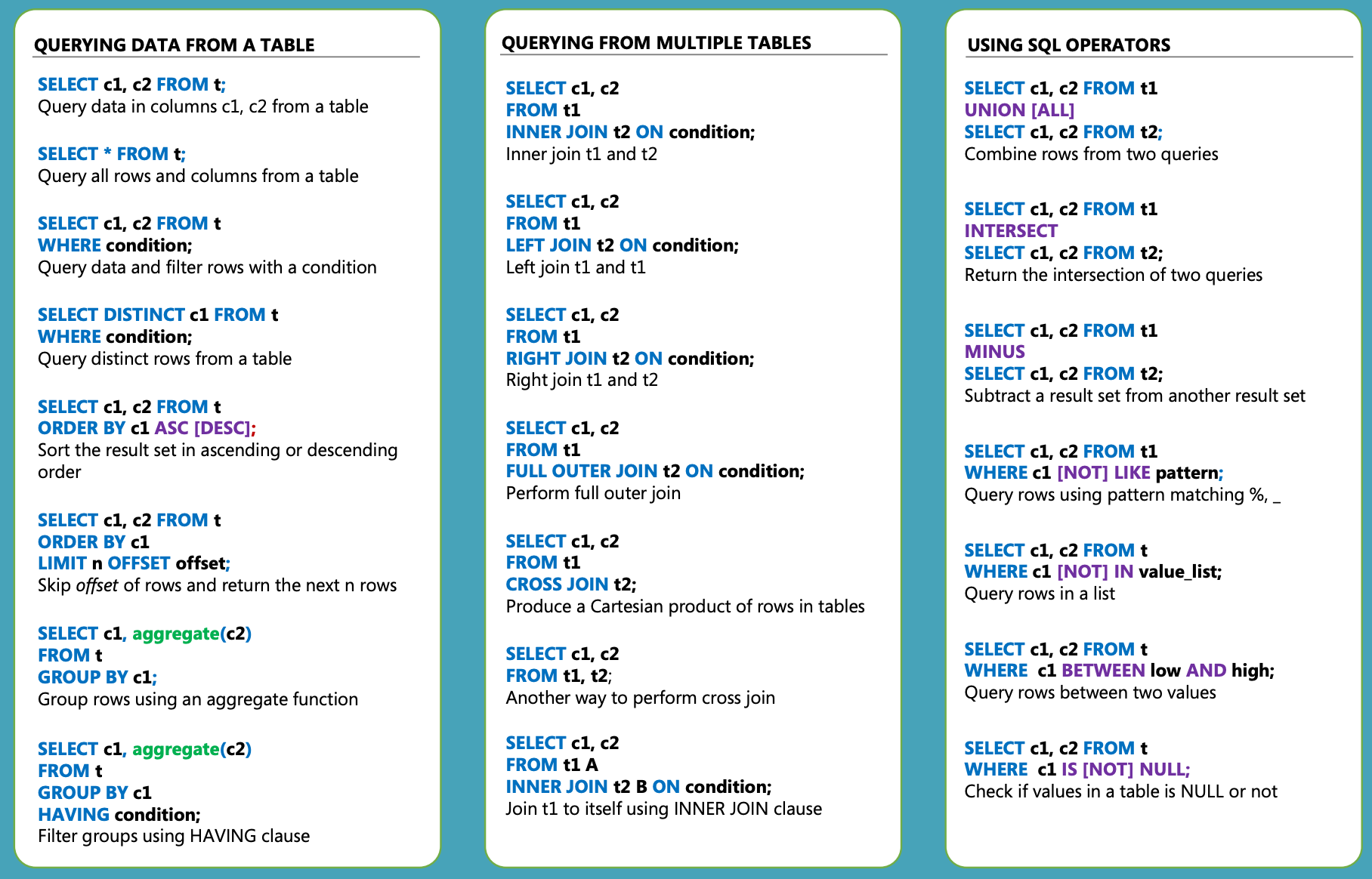
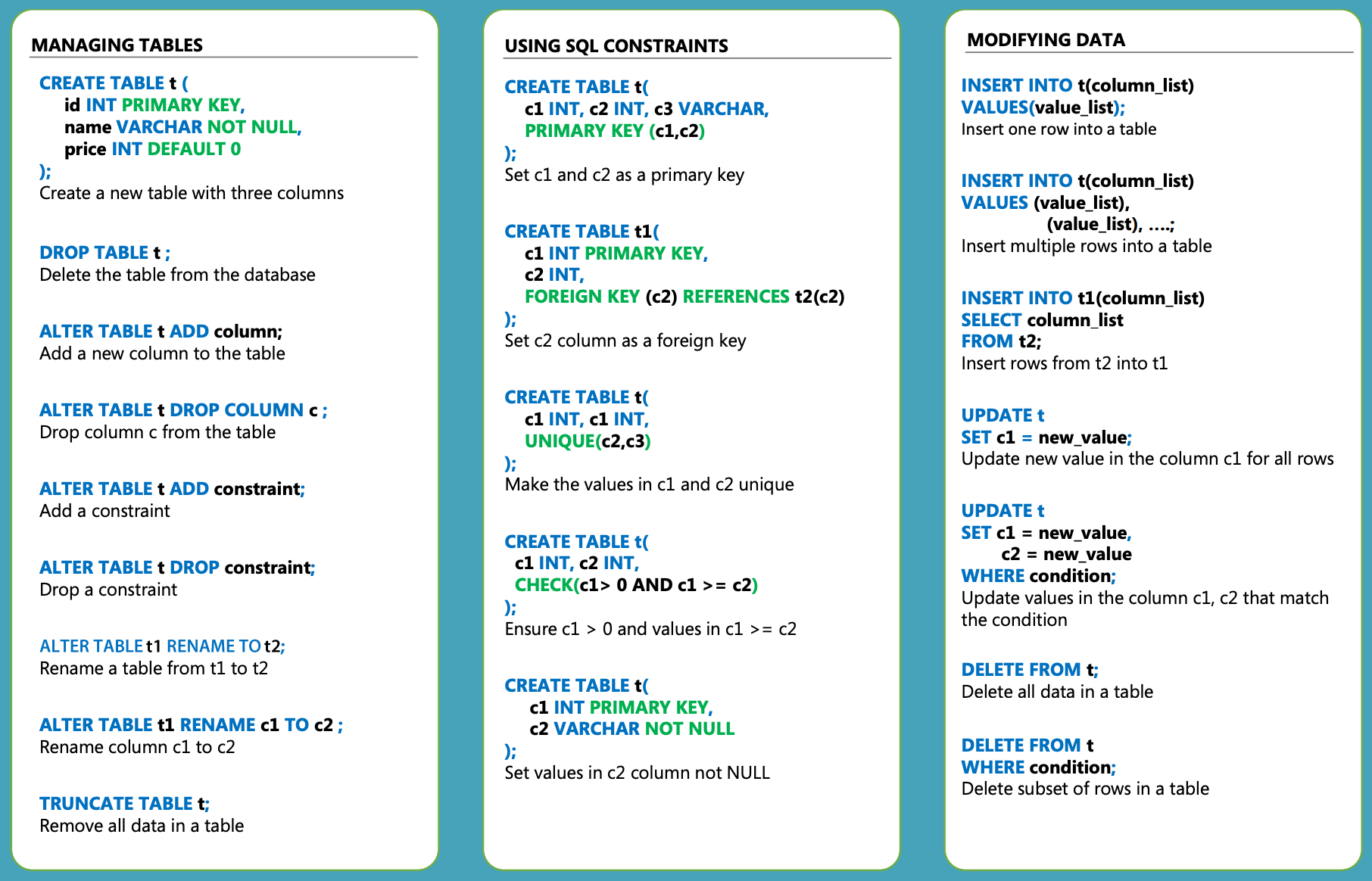
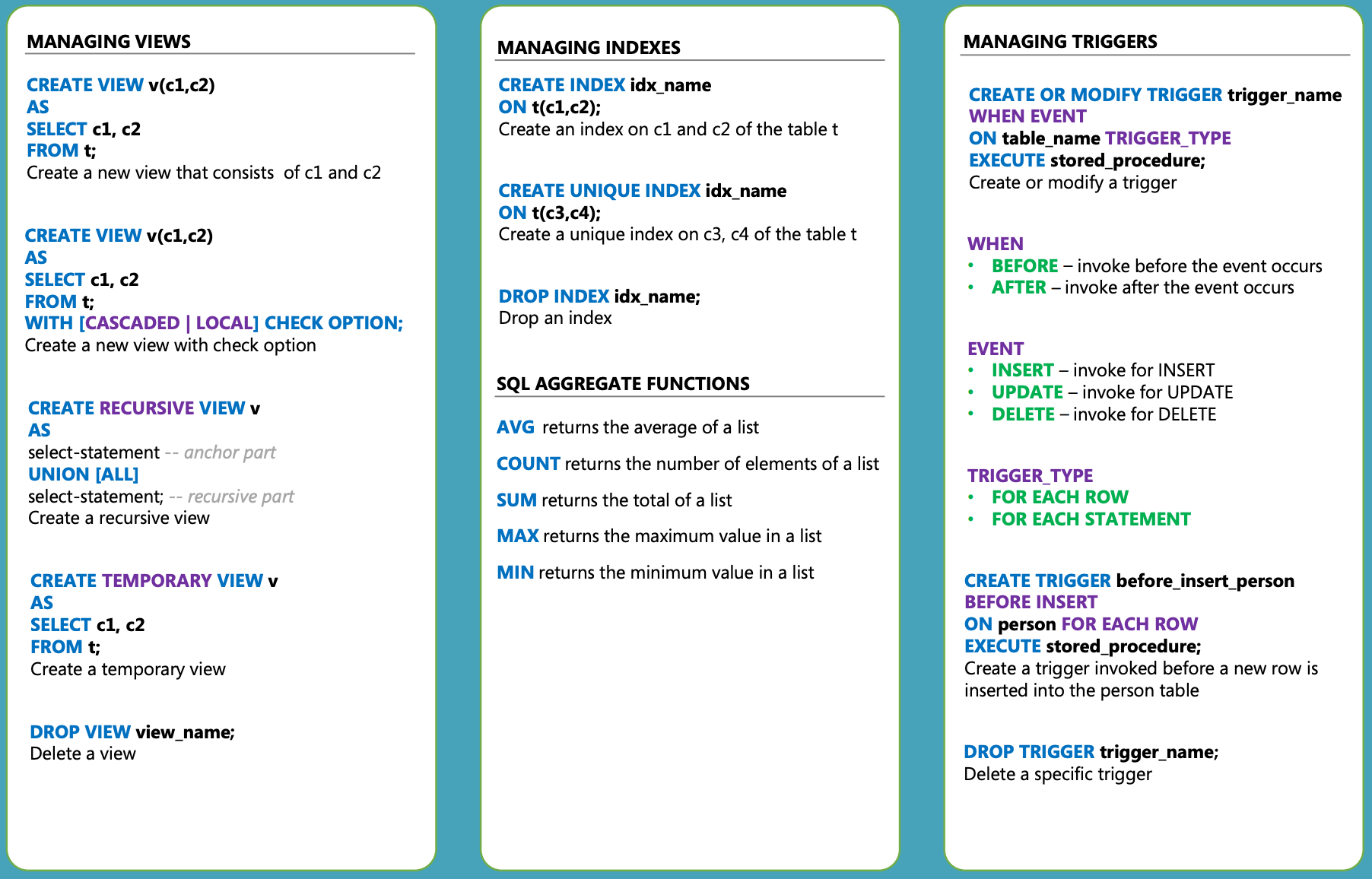
But hey now, we ain’t finished yet….
Some SQL Tips
I know right? I’m taking care of you. I enjoy taking care of you. Not in a ‘I’m gonna bust a cap in yo ass’ way. More like a ‘i’ll make you a cuppa (tea or wine) whilst you chill on the sofa’ kinda vibe.

I know what you’re thinking, a cup of wine? It’s a thing. Try it.
Here’s some tips.
Use Indexes Wisely
Say you have a Users table with thousands of rows.
CREATE TABLE users (
  id INT PRIMARY KEY,
  email VARCHAR(255),
  created_at DATETIME,
  status VARCHAR(50)
);
Scenario 1: No index on email
SELECT * FROM users WHERE email = '[email protected]';Without an index on email, the database scans every row (a full table scan) to find matching emails — slow for large tables.
Scenario 2: Adding an index on email
CREATE INDEX idx_users_email ON users(email);Now the same query.
SELECT * FROM users WHERE email = '[email protected]';Uses the index to jump directly to matching rows, much faster!
But beware of over-indexing:
Each index slows down
INSERT,UPDATE, andDELETEbecause the index also needs to be maintained and re-indexed.Avoid indexing columns that are rarely searched or updated frequently without need.
Avoid SELECT *
It’s tempting. It’s easy. But SELECT * is usually a performance killer, and a maintainability headache.
But why?
Fetches unnecessary columns: You're retrieving every single column, even ones you don't need. That means more data transferred over the network, more memory used, and slower response times, especially if you're pulling large text/blob fields or wide tables.
Breaks caching: Query caches are more effective when queries are explicit.
SELECT *can prevent the DB engine (and your app) from recognising repeatable query patterns.Slows down ORMs: Many ORMs hydrate full objects based on returned columns. If you're pulling 30 columns but only need 2, you're wasting both time and memory.
Fragile to schema changes: If someone adds a new column to the table, suddenly your query includes more data than before — potentially causing unexpected bugs.
Be explicit with the fields you need:
-- Bad:
SELECT * FROM users WHERE status = 'active';

-- Good:
SELECT id, name, email FROM users WHERE status = 'active';
But it’s not all bad, you could possibly use select * when:
Quick debugging in the console.
Ad hoc data exploration where you genuinely want everything.
Small internal tables with 3–4 columns where performance impact is negligible.
Want more? I’ve got an extended version of this article right [here]. It’s behind a paywall — just $5 a month — and it helps support the work I’m doing. Plus, since there are already paid subscribers, it’s only fair they get a little extra love, right?