Before I get into the meaty bits, I should probably tell you about MVC.
It stands for:
Model
View
Controller
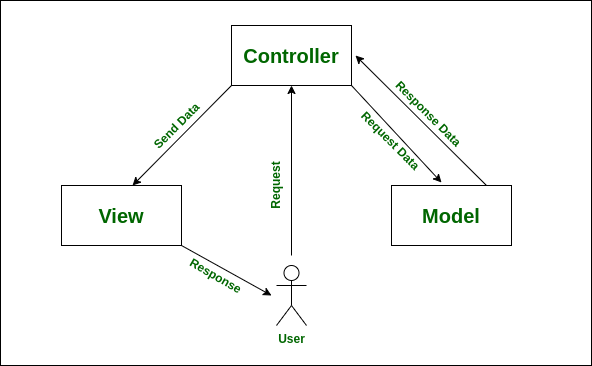
It’s an architectural pattern used by Laravel (and many other frameworks) to separate responsibilities.
If your app was a café:
The Model is the chef in the kitchen
The View is the plate of food on the table
The Controller is the waiter, taking the order and delivering the dish.
Let’s break it down:
Model — "The Brain"
This is where your data lives.
The Model handles database interactions.
It knows how to fetch, update, and relate to other pieces of data.
In Laravel, this is your Eloquent model (
User,Post,Order, etc).
Example:
User::where('role', 'admin')->get();This is the Model doing its job, talking to the database and returning information.
View — "The Face"
This is what the user sees.
The View handles the UI or the final output.
In web apps, this could be a Blade file.
In APIs, it could be a JSON response, often using a Resource class.
Example:
return view('dashboard', ['users' => $users]);Or, for APIs:
return UserResource::collection($users);Controller — "The Middleman"
A controller like the front-of-house manager in a restaurant. It doesn’t cook the food, it doesn’t wash the dishes, but it knows who wants what, and makes sure things end up in the right place.
This is the glue.
The Controller receives the HTTP request.
It delegates to the Model to get data.
It might call a Service for business logic.
It passes the data to a View or Resource to return the final response.
In a healthy setup, the controller should just orchestrate. It’s not supposed to do all the work, it should delegate the work to the right places.
Essentially, controllers are meant to handle HTTP requests and return responses.
But as your application grows, it’s easy to fall into the trap of controller bloat.
But what is controller bloat?

Sorry to shit on your chips, but it’s not a guy who works in an airport control room and has just smashed 15 pork pies during his lunch break. It’s not even about controllers being "big" in the literal sense.
Controller bloat happens when your controllers start doing way too much. Instead of simply coordinating the request and response, they:
Validate incoming data
Query and filter models
Apply business logic
Format the response
Sometimes even send emails, logs, or events
And… return a view or JSON at the end
I’ve seen it happen time and time again, controllers become dumping grounds for business logic, data transformations, and validations.
The Problem: A Bloated Controller
Imagine a simple endpoint: GET /api/users, which:
Accepts filter parameters (
role,active).Applies some business rules.
Returns a JSON response.
namespace App\Http\Controllers;

use Illuminate\Http\Request;
use Illuminate\Http\Response;
use App\Models\User;

class UserController extends Controller
{
    public function index(Request $request): Response
    {
        $validated = $request->validate([
            'role' => 'sometimes|string|in:admin,editor,viewer',
            'active' => 'sometimes|boolean',
            'per_page' => 'sometimes|integer|min:1|max:100',
            'page' => 'sometimes|integer|min:1',
        ]);

        $query = User::query();

        if (isset($validated['role'])) {
            $query->where('role', $validated['role']);
        }

        if (array_key_exists('active', $validated)) {
            $query->where('is_active', (bool) $validated['active']);
        }

        // Business logic: Exclude users with banned email domains
        $bannedDomains = ['spam.com', 'baddomain.org'];
        $query->whereNotIn('email_domain', $bannedDomains);

        // Apply pagination with default fallback
        $perPage = $validated['per_page'] ?? 20;
        $page = $validated['page'] ?? null;

        $users = $query->orderBy('created_at', 'desc')->paginate($perPage, ['*'], 'page', $page);

        // Transform the collection to limit the returned fields
        $users->getCollection()->transform(function ($user) {
            return [
                'id' => $user->id,
                'name' => $user->name,
                'email' => $user->email,
                'role' => $user->role,
                'active' => $user->is_active,
            ];
        });

        return response()->json($users);
    }
}
It’s not horrible… but we’ve mixed request validation, filtering, and business rules all into one method.
And to be clear, it’s totally fine to do this in the early stages of a project. When you’re moving fast and validating ideas, a little mess is expected. But as your app grows, this approach doesn’t scale well. You’ll need to start thinking more about separation of concerns and long-term maintainability.
Also, heads up: if you ever find yourself in a technical interview, guess what one of the most common questions is?
“How do you clean up messy code?”
Spoiler: It's this exact kind of thing they’re talking about.
So here’s how I’d clean this up, broken down into a few steps:
Step 1: Move Validation to a Custom Request
Simple enough to do. So let’s do it.
php artisan make:request UserRequestThis scaffolds a new class for us. Let’s populate it.
namespace App\Http\Requests;

use Illuminate\Foundation\Http\FormRequest;

class UserRequest extends FormRequest
{
    public function authorize()
    {
        return true;
    }

    public function rules(): array
    {
        return [
            'role' => 'sometimes|string|in:admin,editor,viewer',
            'active' => 'sometimes|boolean',
            'per_page' => 'sometimes|integer|min:1|max:100',
            'page' => 'sometimes|integer|min:1',
        ];
    }
}
Step 2: Move Filtering Logic to Model Scopes
Next, let’s move query filters to the User model. Add scopes for role and active filters:
namespace App\Models;

use Illuminate\Database\Eloquent\Builder;
use Illuminate\Database\Eloquent\Model;

class User extends Model
{
    public function scopeRole(Builder $query, string $role): Builder
    {
        if ($role) {
            $query->where('role', $role);
        }
        return $query;
    }

    public function scopeActive(Builder $query, bool $active): Builder
    {
        if (!is_null($active)) {
            $query->where('is_active', $active);
        }
        return $query;
    }

    public function scopeExcludeBannedDomains(Builder $query, array $bannedDomains): Builder
    {
        if (!empty($bannedDomains)) {
            $query->whereNotIn('email_domain', $bannedDomains);
        }
        return $query;
    }
}
Step 3: Move Business Logic to a Service Class
We create a service class to encapsulate the business logic (this is optional by the way):
namespace App\Services;

use App\Models\User;
use Illuminate\Pagination\LengthAwarePaginator;

class UserService
{
    protected $bannedDomains = ['spam.com', 'baddomain.org'];

    public function getUsers(array $filters, int $perPage = 20, ?int $page = null): LengthAwarePaginator
    {
        return User::query()
            ->role($filters['role'] ?? null)
            ->active($filters['active'] ?? null)
            ->excludeBannedDomains($this->bannedDomains)
            ->select('id', 'name', 'email', 'role', 'is_active')
            ->orderBy('created_at', 'desc')
            ->paginate($perPage, ['*'], 'page', $page);
    }
}
Step 4: Use Resource Classes for Output
Generate a resource:
php artisan make:resource UserResourceAnd populate it:
namespace App\Http\Resources;

use Illuminate\Http\Resources\Json\JsonResource;

class UserResource extends JsonResource
{
    public function toArray($request): array
    {
        return [
            'id' => $this->id,
            'name' => $this->name,
            'email' => $this->email,
            'role' => $this->role,
            'active' => $this->is_active,
        ];
    }
}
So what’s the final controller method look like now?
namespace App\Http\Controllers;

use App\Http\Requests\UserRequest;
use App\Http\Resources\UserResource;
use App\Services\UserService;
use Illuminate\Http\Resources\Json\AnonymousResourceCollection;

class UserController extends Controller
{
    public function index(UserRequest $request, UserService $service): AnonymousResourceCollection
    {
        $filters = $request->only(['role', 'active']);
        $perPage = $request->input('per_page', 20);
        $page = $request->input('page', null);

        $users = $service->getUsers($filters, $perPage, $page);

        return UserResource::collection($users);
    }
}
I’ll close off the article by listing some advantages:
Validation is Delegated
The
UserRequestclass handles all input validation (role,active,per_page,page).This keeps the controller method clean and focused solely on processing valid data.
Business Logic Encapsulated in the Service
The
UserServicemanages query building, filtering, and business rules like excluding banned domains.The controller doesn’t know the details of how users are fetched, making it easier to update or test business logic independently.
Presentation Logic Encapsulated in Resource
UserResourcetransforms the user models into a consistent API response format.This isolates the data formatting and allows easy modification without touching controller or service.
Controller Focuses on Orchestration
The controller orchestrates the flow: it accepts validated input, calls the service to get data, and returns a properly formatted resource collection.
No complex logic or business rules clutter the controller, it just connects pieces.
Improved Readability & Maintainability
By splitting responsibilities, each class does one thing well.
Easier to understand, debug, and extend without fear of breaking unrelated code.
Easier Testing
You can test:
Validation rules in the
UserRequest.Query/filter logic and business rules in
UserService.Output formatting in
UserResource.
Controller tests become simple integration tests.
Scalability
As your app grows, adding new filters, business rules, or response formats can be done in their respective layers without bloating the controller.
Encourages a clean and maintainable codebase over time.
You’re welcome.

Bye-bye!